A Better Excel Checkbook Register
Hi, I’m a former Quicken user. Many years ago, I decided to abandon Quicken and replace it with a simple spreadsheet to manage my bank accounts. I explored and tested a lot of Excel checkbook register templates but all of them were either buggy or woefully lacking. So, I created my own and began to offer it in 2019. Hundreds of people loved it and encouraged me to enhance it.
Maybe you’re also tired of monthly subscriptions and you’re looking to replace Quicken, MINT, Tiller, or Simplifi. Perhaps like me, you want to protect yourself from 3rd party apps that require access to your bank accounts. Or maybe you have a small business and need an easy-to-use bank account spreadsheet. If so, please check out the offerings below. Email support is included with all of my Microsoft Excel templates.
Why Choose Excel-Checkbook.com?
- ✅ No monthly subscription
- ✅ No bank login required / Your data stays private on your computer
- ✅ Works offline — just Microsoft Excel
- ✅ Email support included by the author (USA based)
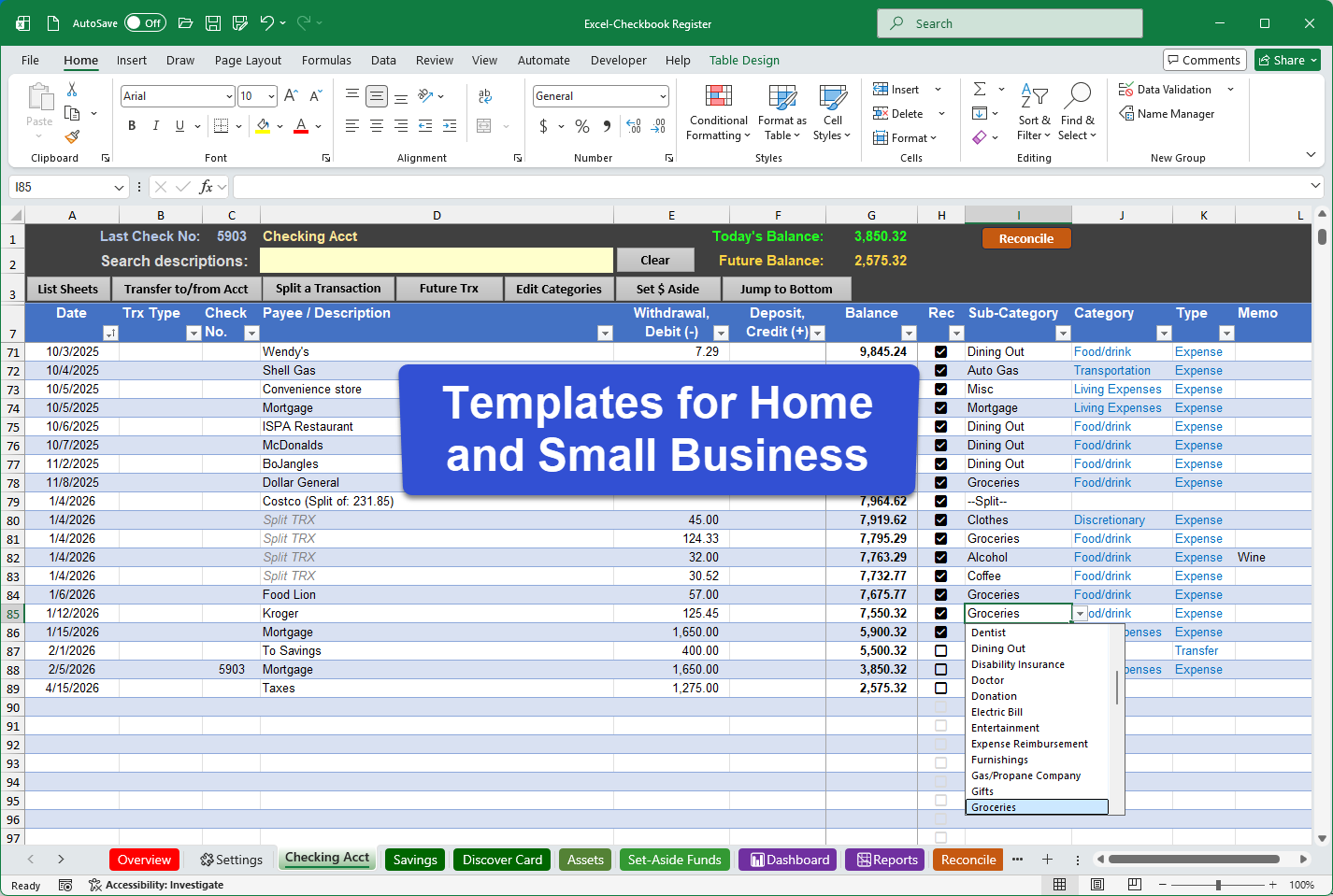
There are several Excel Checkbook Templates to choose from. This includes the Small Business edition, the 2026 version for home use, and a previous 2025 version for home use. See a comparison of available Excel checkbook register templates. Note: regardless of the version you choose, you can safely use any version into the future. There are no date-related restrictions.
Are you looking for a basic (free) checkbook register spreadsheet to replace Quicken? I have a free download you can use. You can upgrade later and bring your data with you to an enhanced version!
See my honest reviews of other Microsoft Excel checkbook register templates along with their issues and annoyances. This includes a look at the free checkbook register templates from Microsoft (which are awful!).
Why would you want to use Microsoft Excel for your bank accounts? Excel is one of the most useful software programs to have ever been created! Learning how to use Excel can be beneficial in so many other areas of life. But I also recommend it so that you can have independence from third-party applications that want to have direct access to your bank accounts, which also means better control of your data privacy. Excel also gives you the ability to customize and extend your own solution to best fit your needs. Read why Microsoft Excel is an excellent tool for checkbook management that puts you in control of your information.
“AI” Summary of Customer Reviews. All reviews are from verified purchasers collected after purchase.
The vast majority of reviews express high satisfaction, appreciation for value and usability, and praise for the product’s features and support. A small minority include mild neutral/constructive feedback, with hardly any outright negative sentiment.
(Generated from ChatGPT from analysis of the following unedited reviews from real people).
Thanks so much for building this tool and making it available so economically - all users (small business or otherwise) can and should benefit from using this tool!
I am struggling with one thing though: I manage several farms for my family. As part of that work we pre-pay anticipated expenses for tax reasons in the year prior to using the service, then sometimes get a refund of unused prepay in the year after that year. For example, I might prepay $5000 for to Midwest Electric in Dec 2024 to cover usage in 2025, then get a refund for $500 in early 2026 if (say) we only used $4500 of power in 2025.
I enter those as two transactions, both to Midwest Electric and categorized as Expense, but one with a $5000 debit and the other with a $500 credit. I expected the spreadsheet to give me the net of $4500, but instead it gave me $5500 ... seems like the "expense" entry dominates and the absolute values get added together rather than SUM(Debits) - SUM(Credits).
I got around it by creating a new "Return of Prepay" entry that shows as Income, but then I largely lose the connection to Midwest Electric (and similarly for all the other providers I use).
Is that expected behavior, or am I doing something wrong?
Also, is there somewhere else I should be asking these sorts of questions?
Thank you!!
I am enjoying the updated spreadsheet!
I've been trying to find something simple yet powerful enough to run a smaller farming operation and found this very easy to use and even reports on expenses. I tried using QuickBooks but can't really afford that and its way too much for a small operation.
I'd love to see a Balance Sheet but thanks for a fantastic product!
Hey there, We just downloaded your excel sheet. I can't tell you how much I love it. Its amazing. We have a pretty big sized business that we use quickbooks for. And we found this to use for our rental properties! Its amazing and I love it. My question is.... So the tenants pay a security deposit. How would I categorize that in this system? I know its not income... Its not really an expense. Help!
Thank you for the note! I would propose using a separate register worksheet to track those security deposits. And you might consider either not categorizing them at all, or add a new entry in the category list for Security Deposit but don't give it a Category Type.
If I could reach through this internet connection I’d kiss you right on the lips! I have been looking desperately for an easy to use checkbook program for a small group that wouldn’t break the bank AND that a novice Excel user could relate to. I did try to get fancy one time and wiped out part of my page, but with a small nudge from my Excel expert kids, everything is now back to rights.
I absolutely recommend this product, especially for those old folks like me that need an easy to use, but very useful, checking accounting program. 5 Stars!
I somehow came across your YouTube video on how to create your own Excel spreadsheet for tracking... and then I followed the link 🙂 the pre-made spreadsheet is absolutely great. It saves so much times from creating your own. I purchased the 2024 version and it has so much great tracking abilities. Thank you so much.