Who is this for? This Excel spreadsheet template serves as a practical checkbook register that is ideal for personal home finances which can greatly enhance your financial tracking.
Why choose the Excel Checkbook? No bank login required, your data stays private on your computer! It’s a one-time price vs. Quicken subscriptions!
Note: no matter which version of the Excel Checkbook register that you buy, they don’t expire. You can continue to use any version of the Excel checkbook register that you download for many years to come.
▶ Click here to jump to purchase button.
System Requirements / Compatibility Notes: You must already have the Microsoft Excel program on a Mac computer or Windows PC. This Excel checkbook register template is compatible with Excel 2019 or higher (Windows). It is not compatible with the free Excel online (web) version, nor the mobile app version of Excel, nor Google sheets, LibreOffice, OpenOffice, or any other office clone.
For Mac users, you will need Excel 2019 at a minimum in order for the dashboard to work. While not required, the ability to edit power queries (which are used by the dashboard) is only available in Microsoft 365 for Mac.
If needed, the latest version of Microsoft Office is available for $99.99/year (or $9.99/month), or as a one-time purchase (no subscription).
Tip to save money on Microsoft Office: Microsoft has a discount program that offers 30% off of Microsoft 365 for many employees, teachers and current/past military. A favorite computer website of mine also offers Microsoft Office 2021 (lifetime license) for a really great price, which works well with the Excel checkbook template!
Reconcile Checkbox Feature Requires Microsoft 365: please note that this version features simple check boxes on the register screen to check off transactions during reconciliation. Microsoft added this feature in Microsoft 365. Earlier versions of Excel can still be used but be aware that older Excel versions will show TRUE/FALSE instead of the interactive box
Excel Checkbook Register – Summary of Features
- Manage up to 12 different bank accounts (checking, savings, credit cards). If you need more than 12, see this special link for the expanded 20-register version.
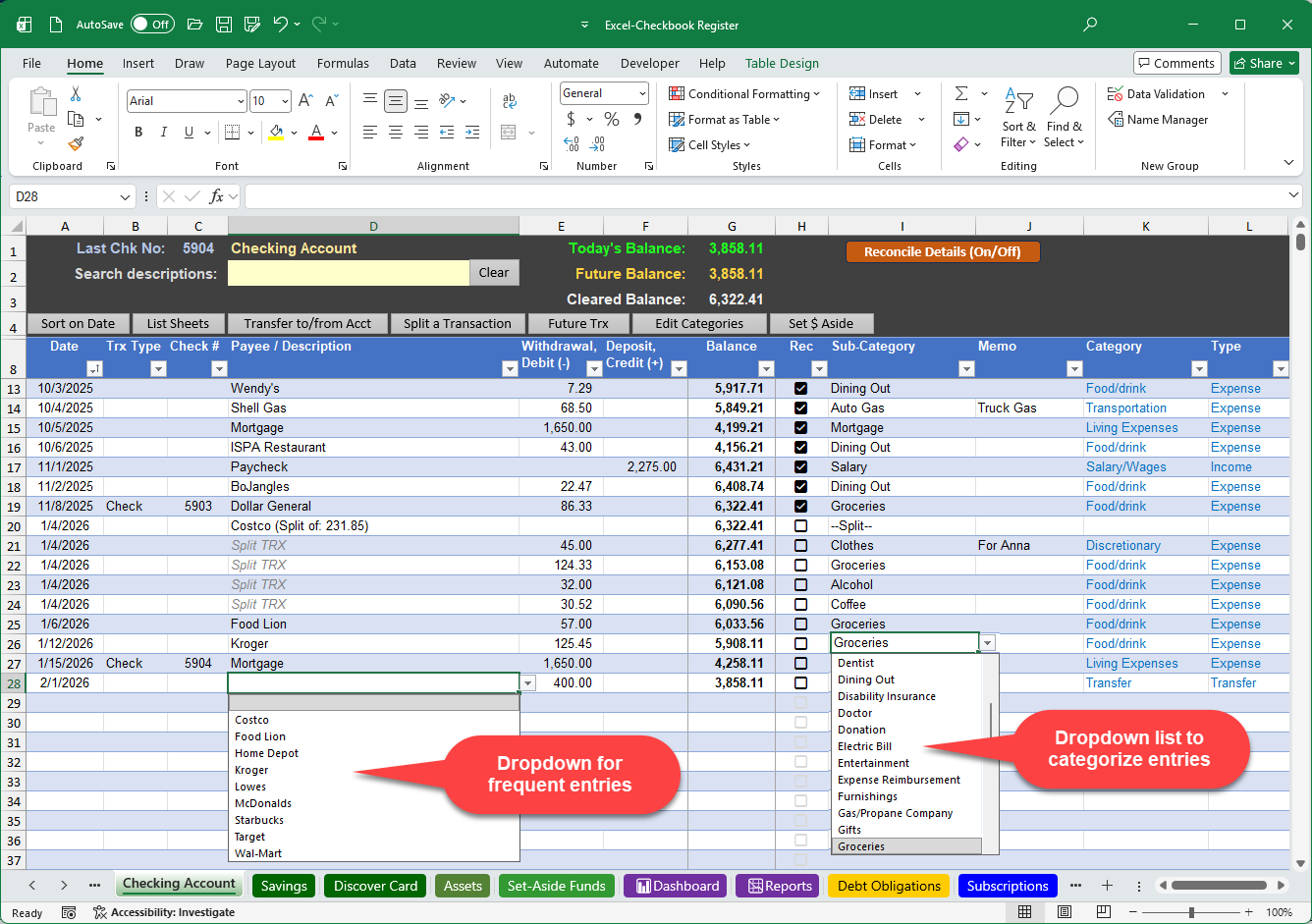
- Easily categorize each entry to track spending by category
- See a visual reminder at the top of each register with current balance, future balance, and last check number entered
- Enjoy two ways to reconcile your checkbook with your bank statement
- Gain the ability to quickly post recurring transactions and deposits to your register with a single click
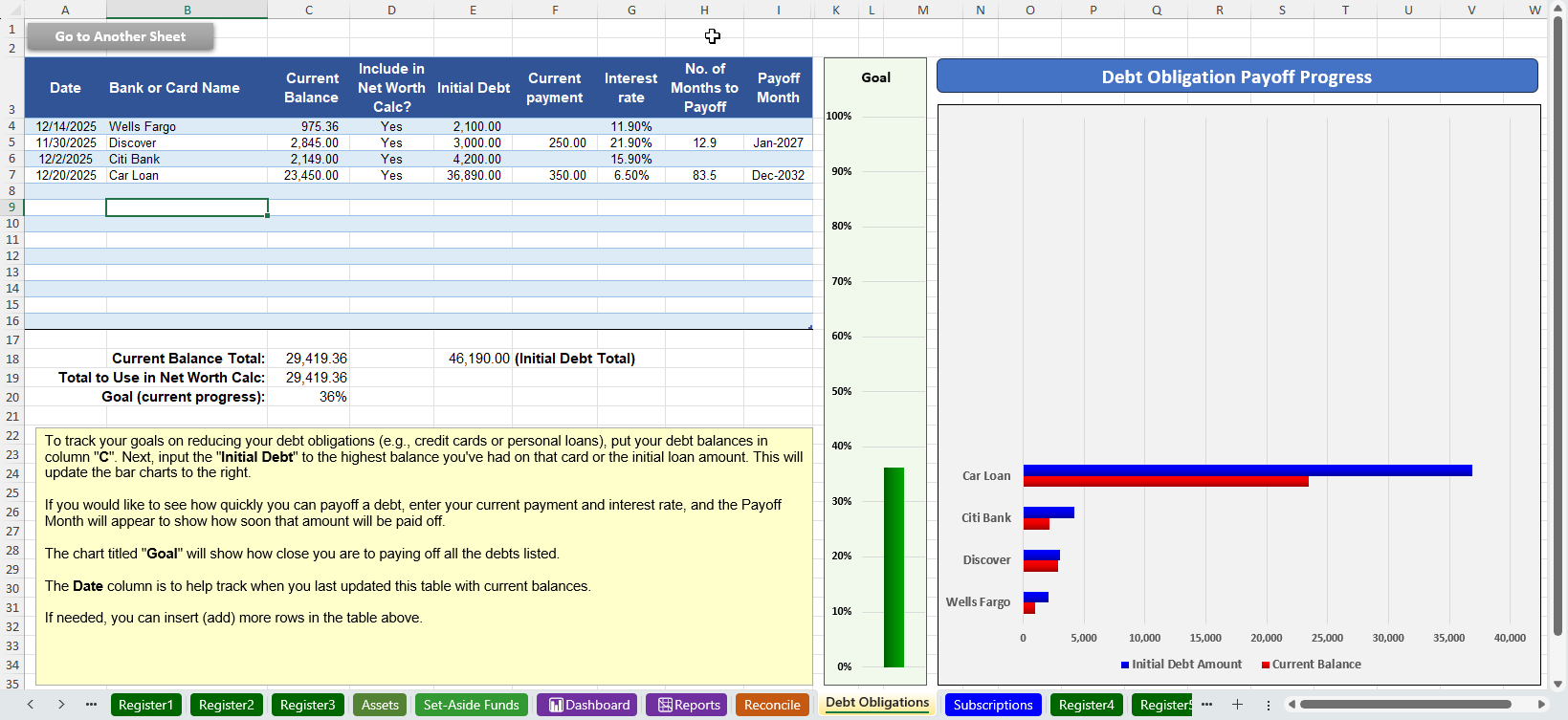
- Track and visually graph your progress for paying down your debt obligations like vehicle loans, mortgages, and credit cards
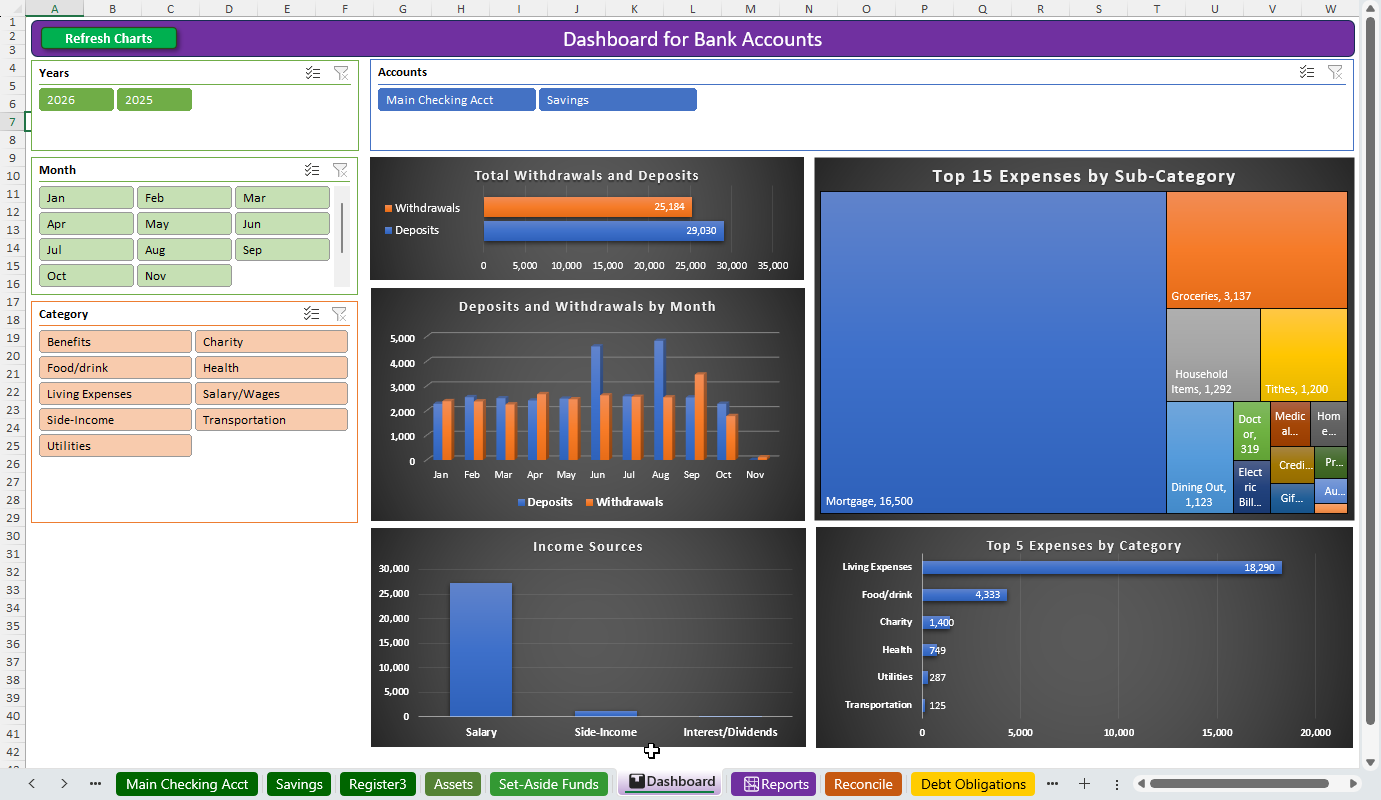
- Visually view your spending with charts for deposits & withdrawals by category and sub-category, with buttons to filter your data by year, month, register and/or category
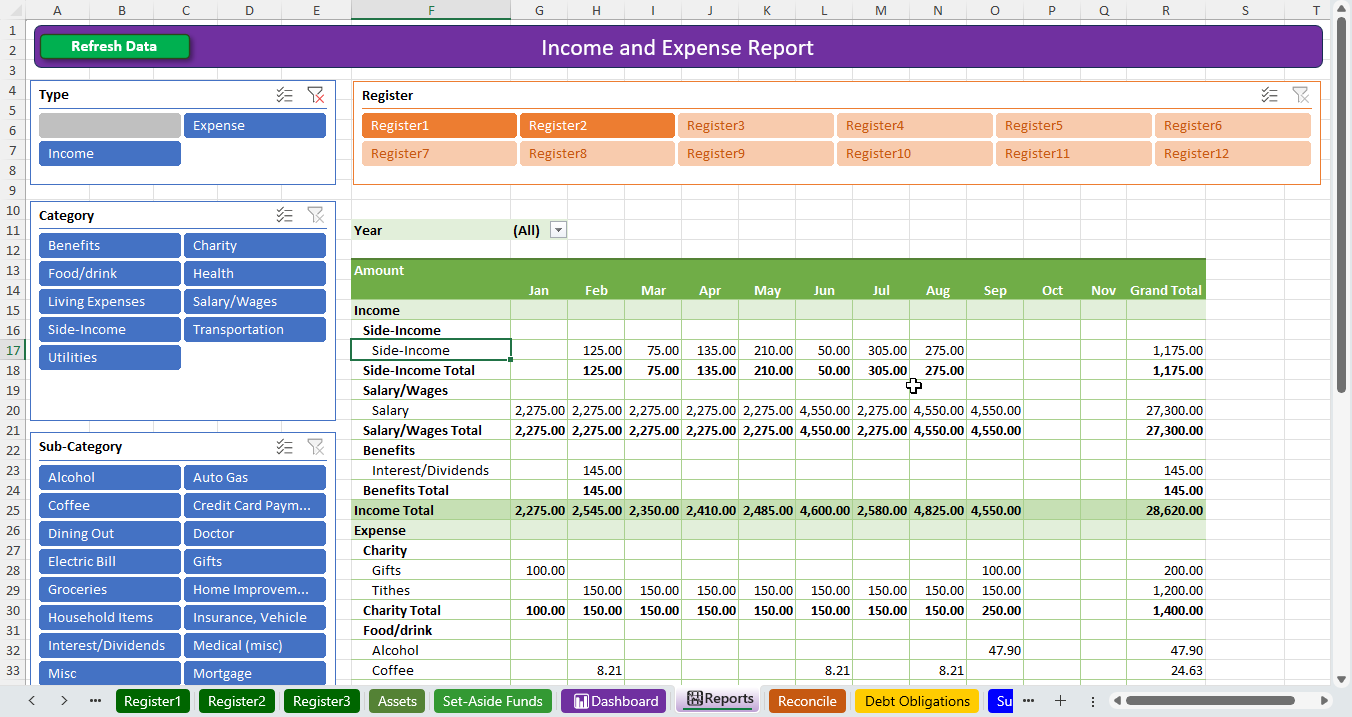
- View your spending with a text-based report, suitable for printing, which also features convenient buttons (slicers) to filter your transactions by year, register, and category
- To accelerate data entry, there are convenient drop-downs for Date, Trx Type, as well as a drop-down list of frequent Payee/Descriptions which will also auto-populate your preferred category when chosen
- Quickly add recurring (future transactions) to any register which has been enhanced to allow specific dates for any entry
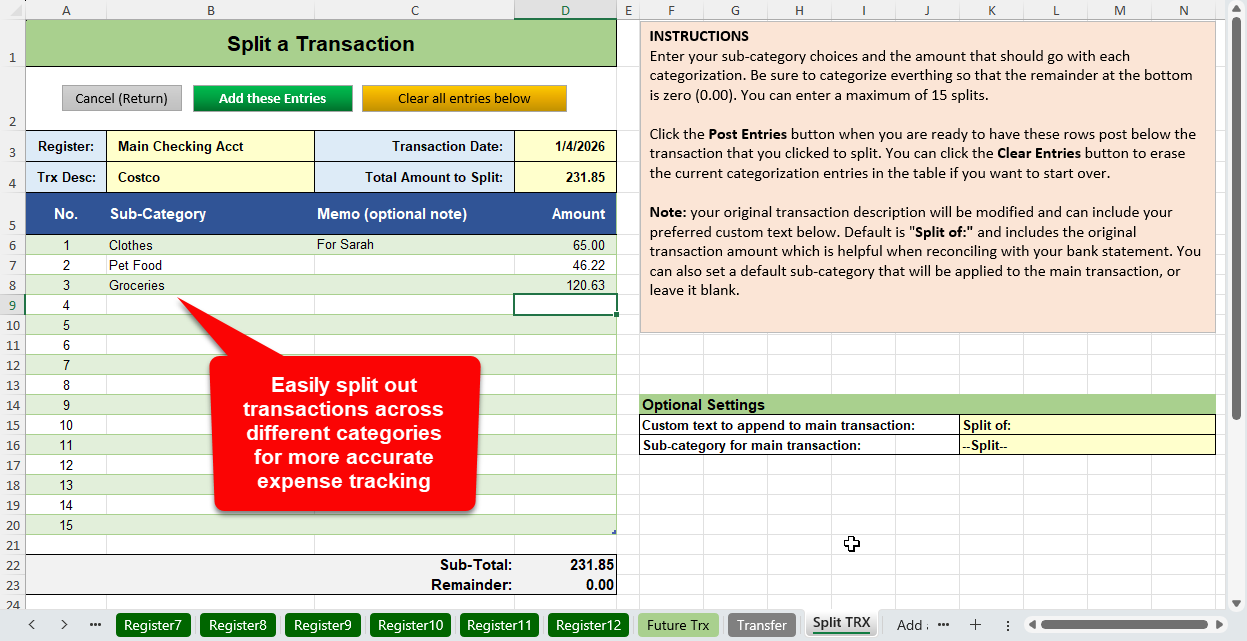
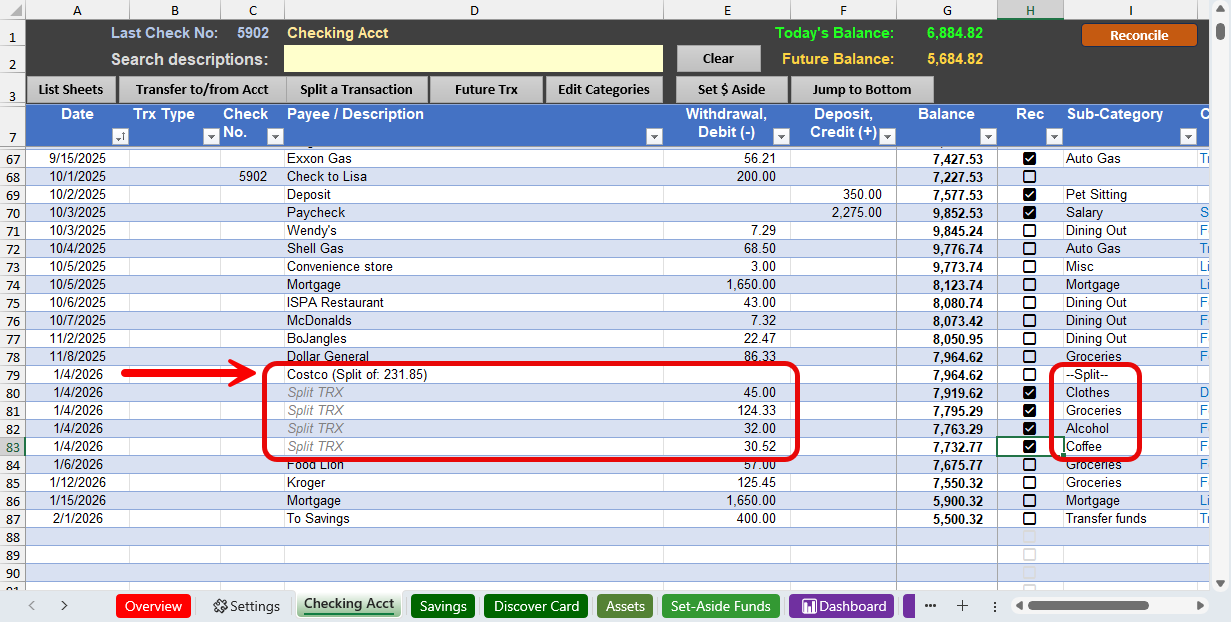
- Split a transaction across multiple categories for better tracking of spending.
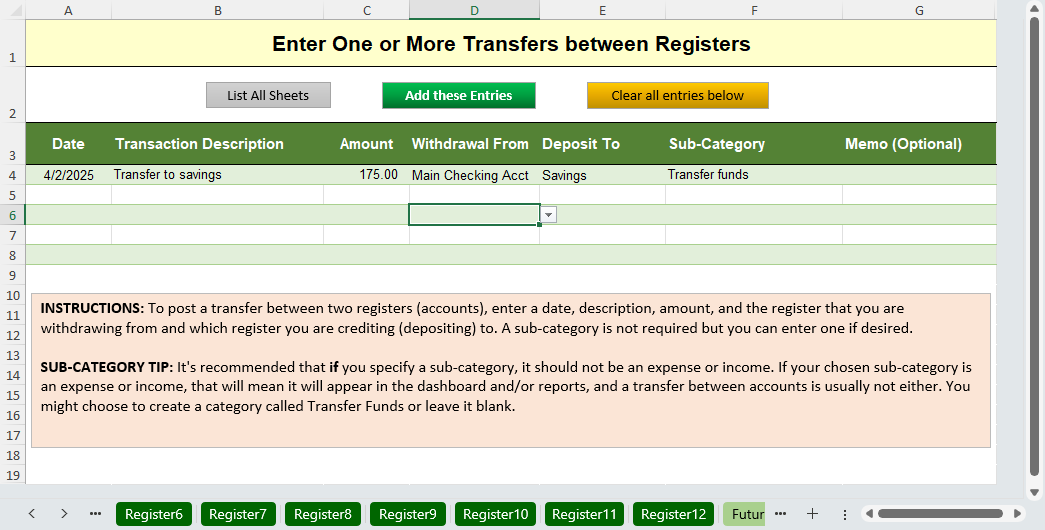
- Enter a transfer transaction (e.g., withdrawal from checking and deposit to savings) as a single entry to save time.
- New for 2026: Easily find transactions by description
- New for 2026: List you assets along with current values to help see your current net worth
- New for 2026: Track your monthly streaming services like music, movies or news to see what their annual costs are and to help remember which credit card is being used for each
- New for 2026: For any debt obligations like vehicle loans or credit cards, easily compare how a change in your monthly payment would shorten the payoff time
- New for 2026: Budget for significant future expenses using the new Set-Aside Funds feature
Up to 12 Bank Registers
You can record transactions for twelve different bank accounts in the Excel Checkbook Register. Those can be any combination of checking, savings and/or credit card accounts — anything that has transactions with dates and dollar amounts. Please note that if you have retirement accounts and/or inactive credit cards with an outstanding balance, you can manage those in the Assets list or Debt Obligations list instead of using a register.
Post Future Transactions with a One-Click Button
This feature makes it super quick to post your recurring transactions into your Excel Checkbook Register with a single button click. In other words, you can create a list of expenses that you have every month, and when you want to paste them into your register, you can click a button and all of them will get entered! These can also be separated into groups in case you only want to post a subset early in the month and a different set when it’s later in the month. Enhanced for 2026 (by customer request), you can also enter a specific date for any entry. Note: a VBA macro is embedded in the template for this feature. Learn more about macros.
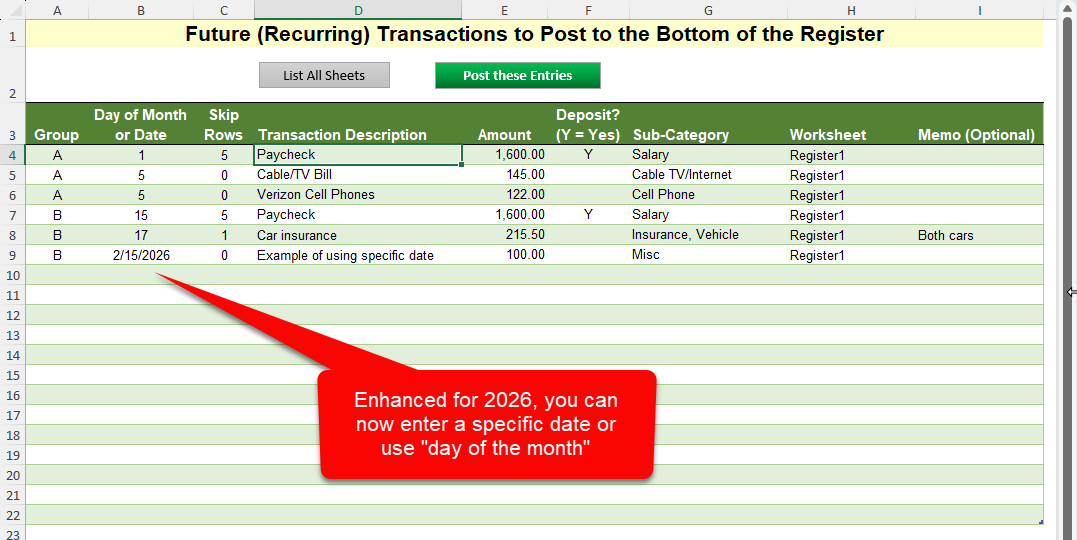
Why is this handy? I like to keep an eye on my bottom line. How much money will I have at the end of the month before I get paid again? By putting in those future expenses, it helps me see how much money I’ll likely have later in the month.
Split a Transaction
For larger expenses or deposits, you can click a button to split out the amounts into different categories for more accurate tracking of your expenses.
Enter a Transfer Between Two Accounts
If you often move money between two accounts (e.g., from a checking account to a savings account), this feature accelerates the data entry so that you only have to enter one entry and it will create the corresponding entry in the other register worksheet.
Reconcile Transactions
If you need to reconcile your transactions against your monthly bank statement, it’s easy to do so. Clicking the button at the top of the register (Reconcile Details) will open a panel of rows where you’ll enter your bank statement’s end date and ending balance. You can review each transaction and mark each one as reconciled, and the screen will keep you updated on how many withdrawals and deposits have not yet cleared.
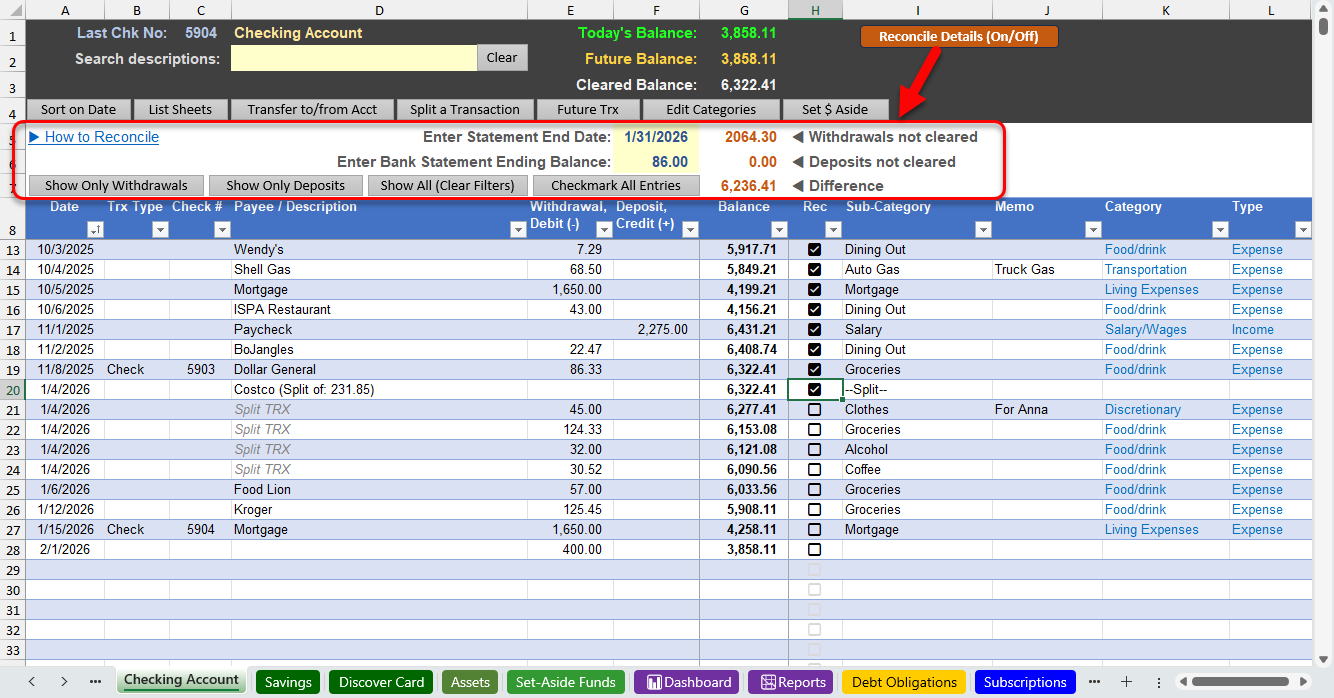
Note: this uses the checkbox feature that is only available in Microsoft 365. However, older versions of Excel will work just fine by putting a single letter (e.g., R, or c, or X) to mark each entry.
Financial Dashboard
The financial dashboard consolidates all of your bank accounts to a single dashboard. There are filter buttons to easily focus on a particular year, month, category and/or to focus on a specific bank account. Note: a VBA macro is embedded in the template for this feature. Learn more about macros.
Financial Report/Statement
The income and expense report screen offers filter buttons to see expenses and credits by year, month, category, sub-category, and/or by specific bank account.
Track Your Progress on Reducing Debt Obligations and Calculate How a Change in Payments Can Help
If you have personal loans or credit cards that you have stopped using but you’d like to visually track your progress on paying them off, this sheet makes it easy to track those debt obligations. You can also experiment with changes to your monthly payments to see how quickly a change will result in a payoff.
Easily Set Aside Funds for a Future Need
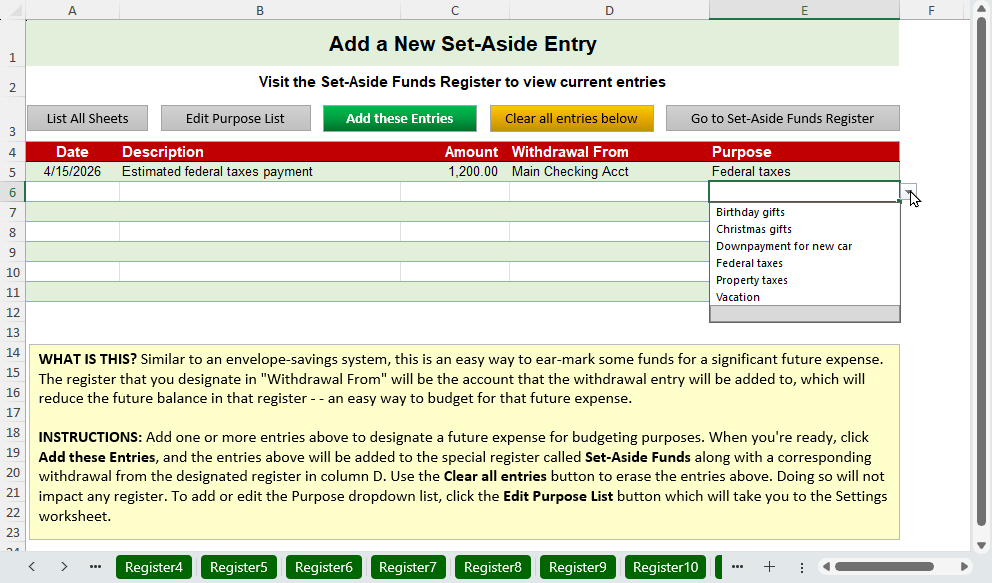
Similar to an envelope saving system, if you’d like to ear-mark funds in one of your bank account registers for a significant future expense, the new set-aside funds feature will help to automate that task. There’s a special register worksheet that will list all of the set-aside funds you have added to the Excel Checkbook Register.
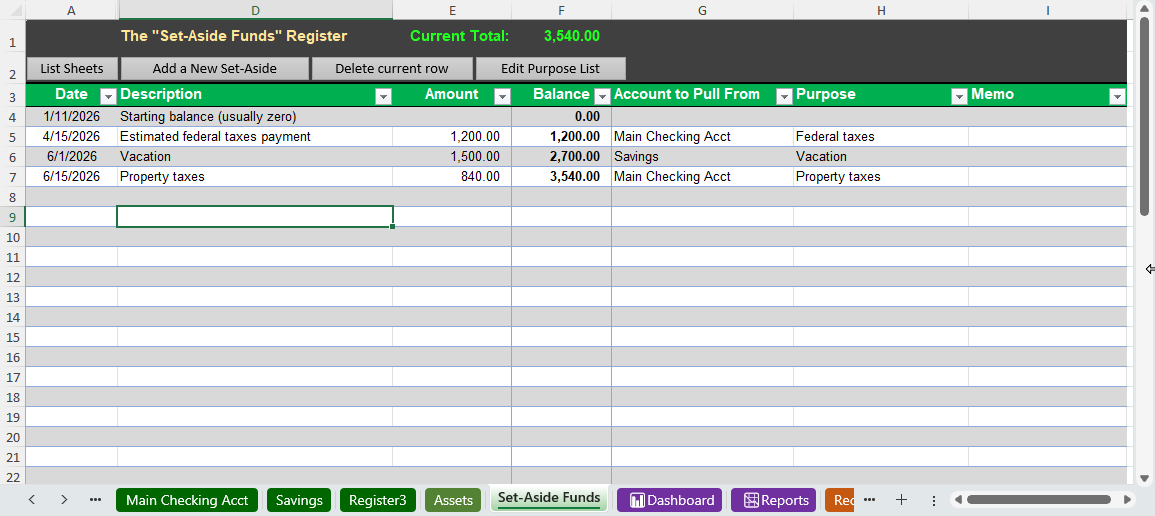
There’s a special screen for adding a new set-aside fund which uses a custom dropdown list for the purpose (fully customizable).
Video Demonstrations
- There’s a full walk-through video on how to use the Excel Checkbook Register.
- If you are upgrading from an earlier version, you can copy data from a previous version. See this video for guidance on that process.
Click the purchase button for instant download
Use discount code SAVE20 during checkout for 20% percent off! Note: this is not a subscription and the spreadsheet will not expire. Once purchased, you can use it forever! (Previous customers of an earlier version, please contact me for a special discount code).
Do you also have a small business? You can add the small business edition of the Excel Checkbook Register and use the discount code above for both.
Guarantee: email me if for any reason this spreadsheet doesn’t work for you. I pride myself in customer support (see testimonials).
Reviews
 Excel Checkbook Home 2026
I used Microsoft Money 2004 since it came out. Microsoft does not support it anymore so I looked for something else. This program is excellent and very easy to use especially for a Senior Citizen like myself. Logan always responds to questions and his customer service is handled the way it should be. I highly recommend this program.
 Excellent use of Excel
This Checkbook Register is so easy to use. And the improvements are amazing. When I upgraded to the 2026 version, there was an issue with my order, I contacted Logan and he immediately took care of the problem. Great customer service.
 Excel Checkbook Home 2026
I have been using this spreadsheet for only a couple of days. And Oh My Gosh, it is the best checkbook register I have used in years. But it is so much more than a register. I see a much bigger picture of our finances.
I am so glad I found you.
-
Thank you for making my day! 🙂

 Customer service
After I created an issue with the spread sheet I emailed a message of my issue. I was contacted the next with the solution to the issue which worked. GREAT customer service.
 Great Worksheet
I have been using your spreadsheet and I very pleased with and also, how easy it is to use.
Write a Review
Submit your review | |
I am enjoying the updated spreadsheet!
Discover more from Excel Checkbook
Subscribe to get the latest posts sent to your email.