
There’s a new 2026 home version of the Excel Checkbook Register now available. You can also view a feature comparison of versions. But if you’re in a hurry and want the 2025 version of the Excel Checkbook Register right away, click here.
Note: no matter which version you might buy, they don’t expire! You can continue to use any version you download for many years to come.
There’s also a Small Business Edition of the Excel Checkbook Register for those with one or more small business ventures.
System Requirements / Compatibility Notes: You must already have the Microsoft Excel program on a Mac computer or Windows PC. This Excel template is compatible with Excel 2019 or higher (Windows). It is not compatible with the free Excel online (web) version, nor the mobile app version of Excel, nor Google sheets, LibreOffice, OpenOffice, or any other office clone.
For Mac users, you will need Excel 2019 at a minimum in order for the dashboard to work. While not required, the ability to edit power queries (which are used by the dashboard) is only available in Microsoft 365 for Mac.
If needed, the latest version of Microsoft Office is available for $99.99/year (or $9.99/month), or as a one-time purchase (no subscription).
Tip to save money on Microsoft Office: Microsoft has a discount program that offers 30% off of Microsoft 365 for many employees, teachers and current/past military. A favorite computer website of mine also offers Microsoft Office 2021 (lifetime license) for a really great price, which works perfectly with the Excel checkbook template!
Excel Checkbook Register Template – Summary of Features
- Manage up to 10 different bank accounts (checking, savings, credit cards).
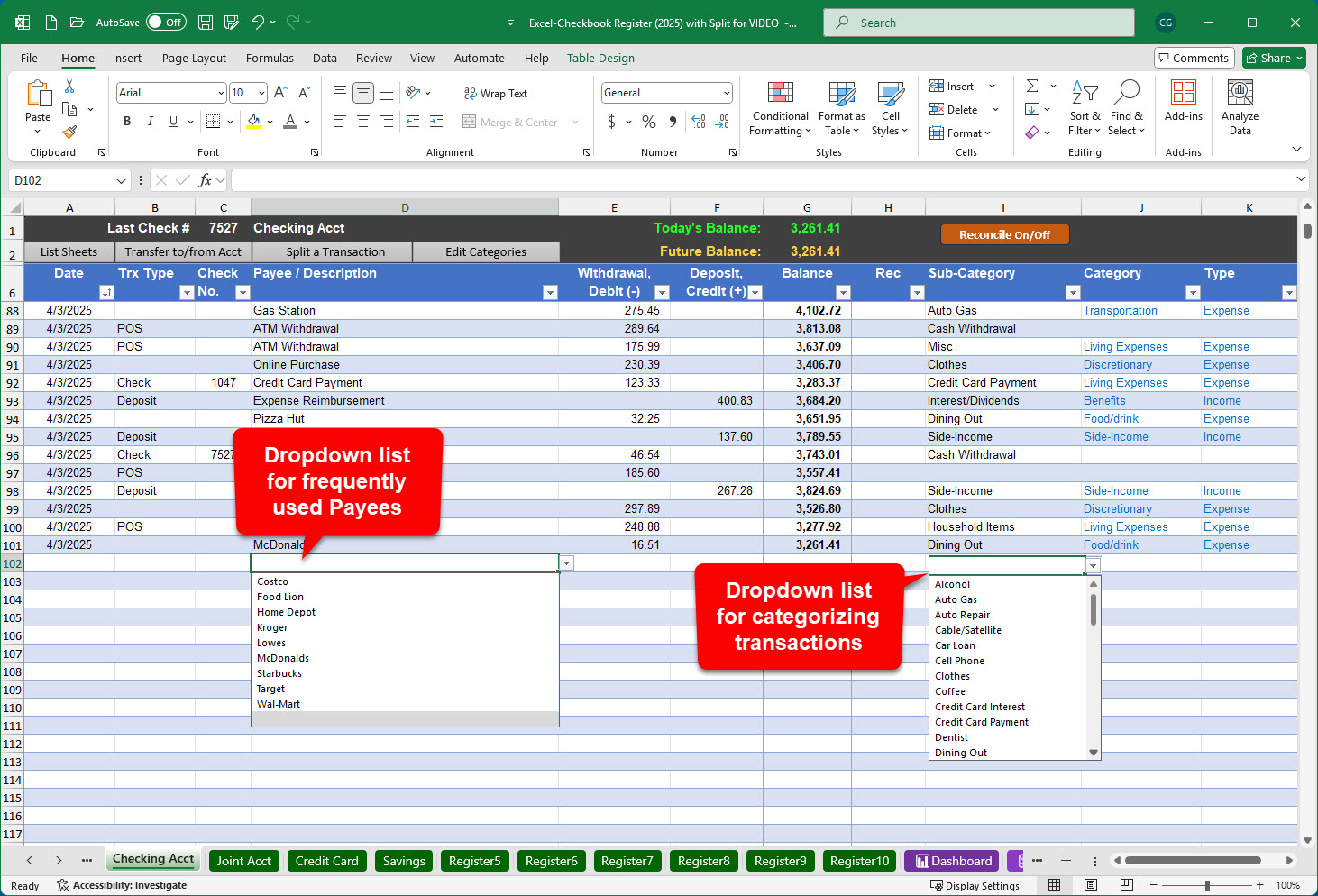
- Easily categorize each entry to track spending by category
- See a visual reminder at the top of each register with current balance, future balance, and last check number entered
- Easily perform a monthly bank statement reconciliation
- Gain the ability to quickly post recurring transactions and deposits to your register with a single click
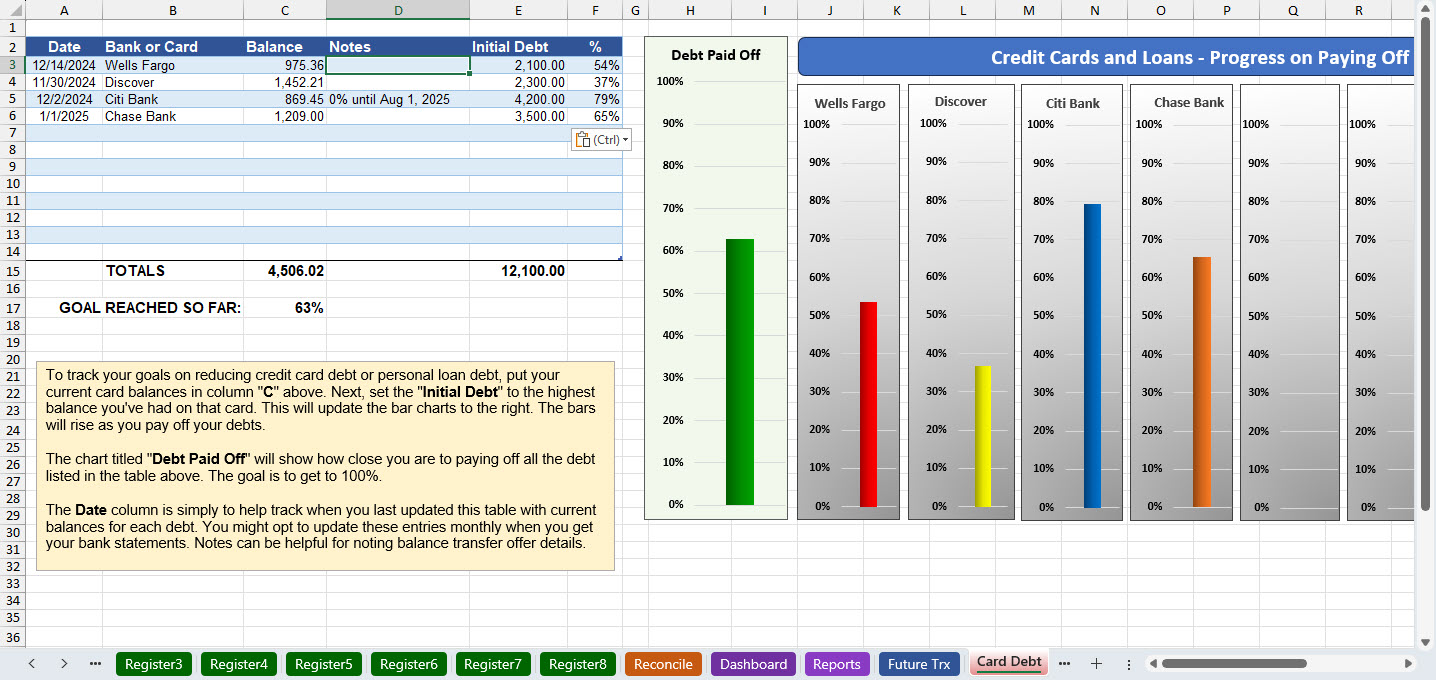
- Track and visually graph your progress for paying down your credit card debt
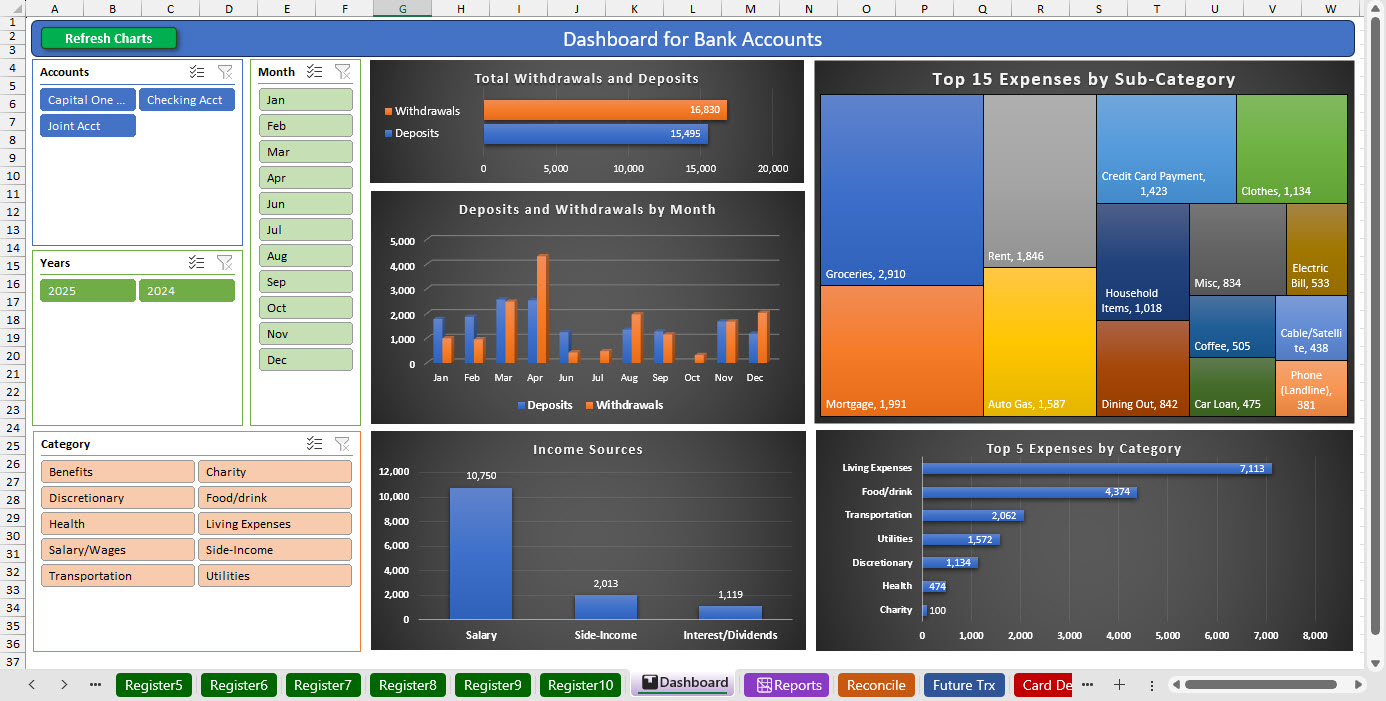
- View your spending with the revamped dashboard which displays charts for deposits & withdrawals by category and sub-category, with buttons to filter your data by year, month, register and/or category
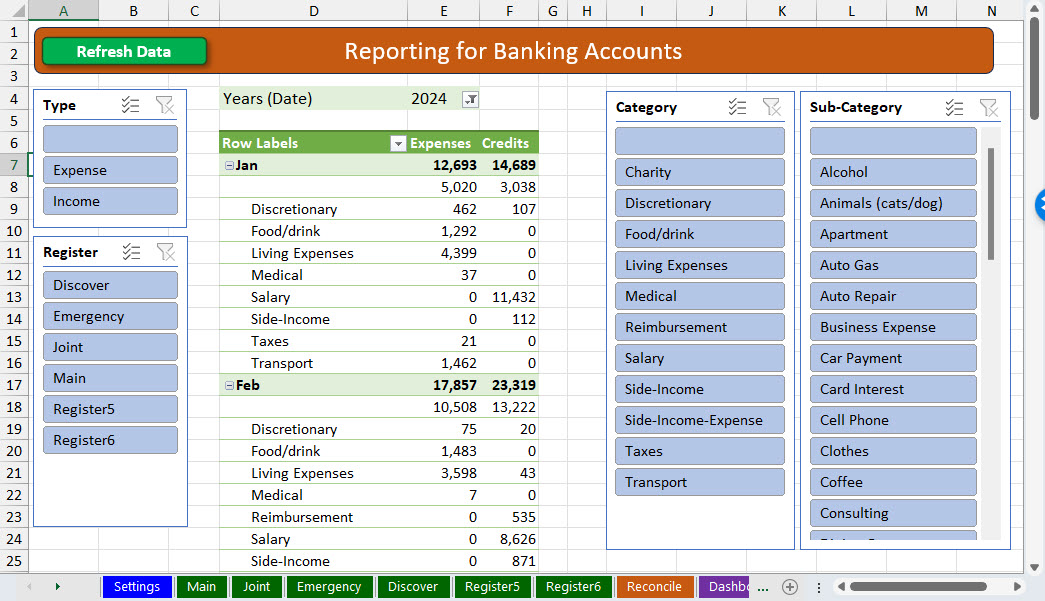
- View your spending with a text-based report, suitable for printing, which also features convenient buttons (slicers) to filter your transactions by year, register, and category
- To accelerate data entry, there are now convenient drop-downs for Date, Trx Type, as well as a drop-down list of frequent Payee/Descriptions which will also auto-populate your preferred category when chosen
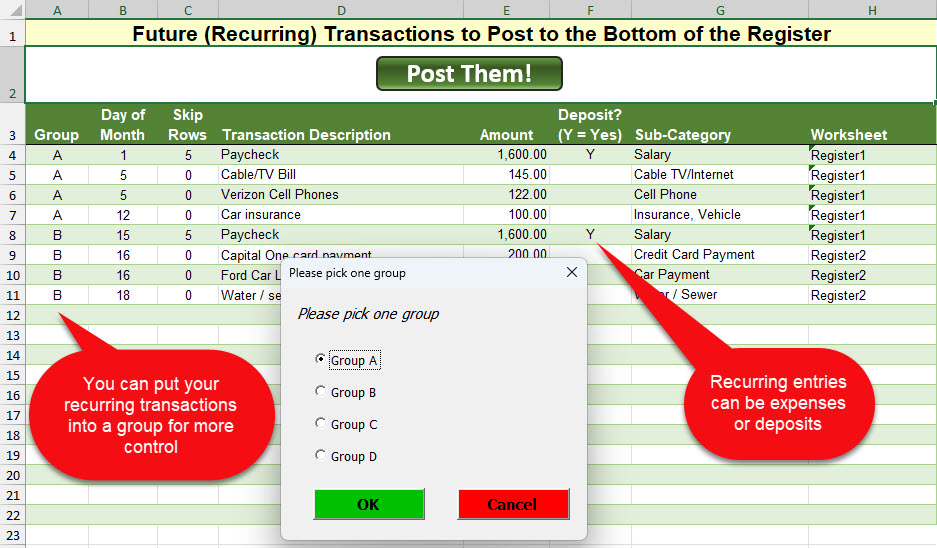
- The Future Transactions feature, for quickly posting recurring entries, has been enhanced with grouping. You can now designate a group letter (A, B, C or D) for your recurring entries so that you can designate that only a certain group of entries is posted when you click the button.
- You can split a transaction across multiple categories for better tracking of spending.
- You can enter a transfer transaction (e.g., withdrawal from checking and deposit to savings) as a single entry to save time.
- New navigation buttons to make it easier/faster to move around.
- Monthly account reconciling has been enhanced to better support the nuances of different bank statements and how written checks are considered.
Up to 10 Registers
You can record transactions for ten different bank accounts. Those can be any combination of checking, savings and/or credit card accounts — anything that has transactions with dates and dollar amounts.
Post Future Transactions with a One-Click Button
This feature makes it super quick to post your recurring transactions into your checkbook with a single button click. In other words, you can create a list of expenses that you have every month, and when you want to paste them into your register, you can click a button and all of them will get entered! These can also be separated into groups, in case you only want to post a subset early in the month and a different set when it’s later in the month. Note: a VBA macro is embedded in the template for this feature. Learn more about macros.
Why is this handy? I like to keep an eye on my bottom line. How much money will I have at the end of the month before I get paid again? By putting in those future expenses, it helps me see how much money I’ll likely have later in the month.
Split a Transaction
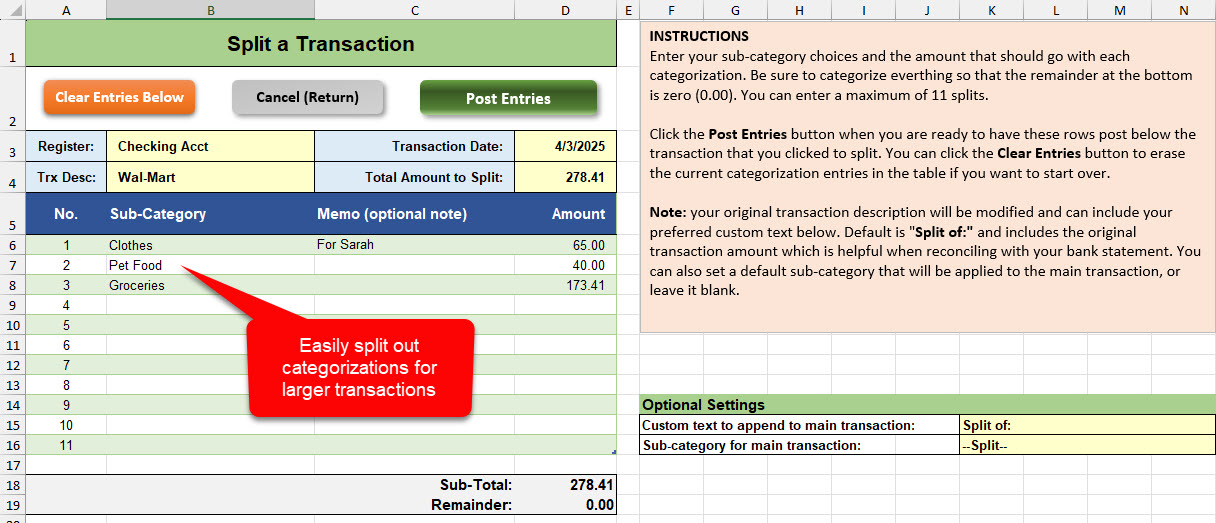
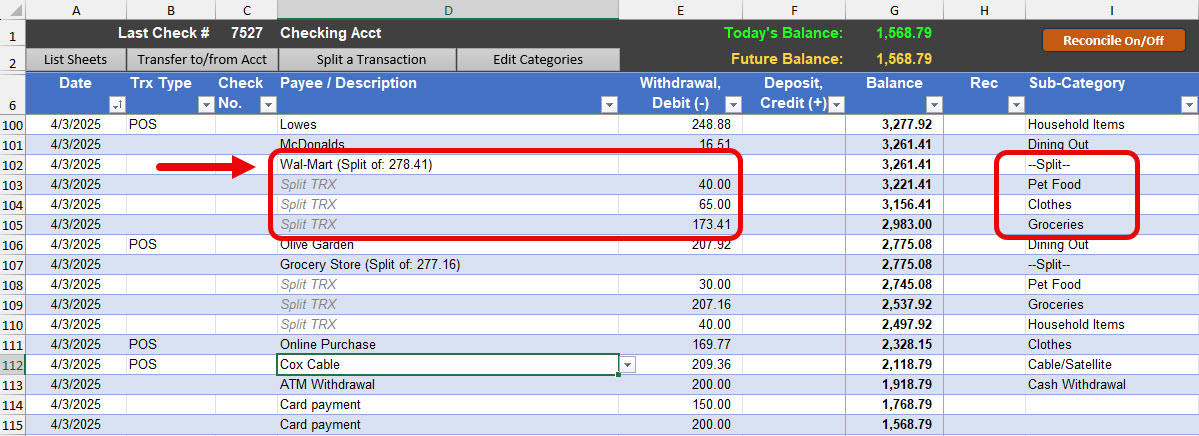
For larger expenses or deposits, you can click a button to split out the amounts into different categories for more accurate tracking of your expenses.
Enter a Transfer Between Two Accounts
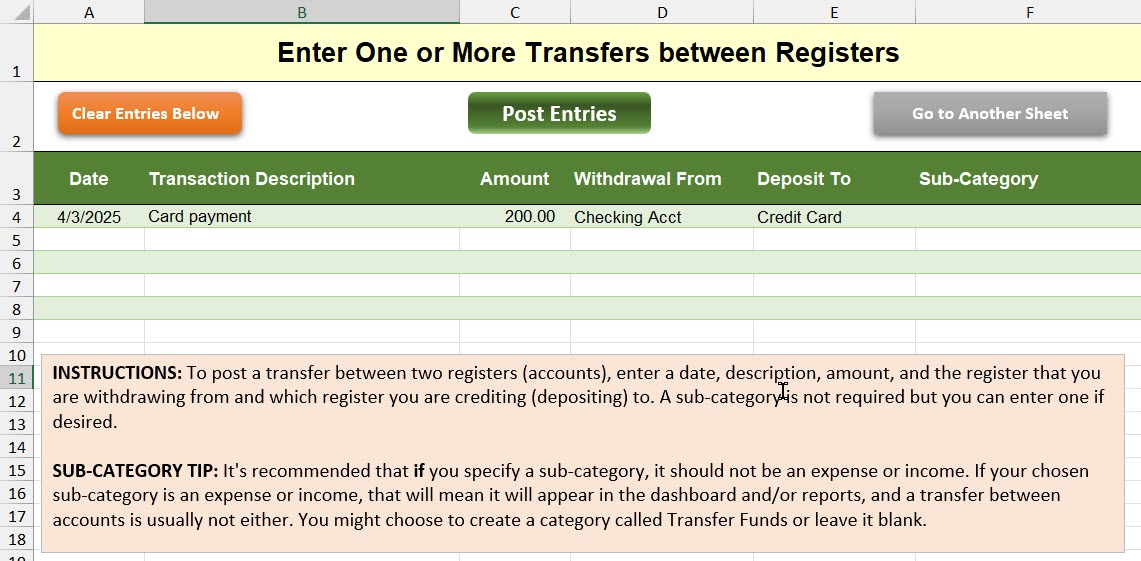
If you often move money between two accounts (e.g., from a checking account to a savings account), this feature accelerates the data entry so that you only have to enter one entry and it will create the corresponding entry in the other account.
Reconcile Transactions
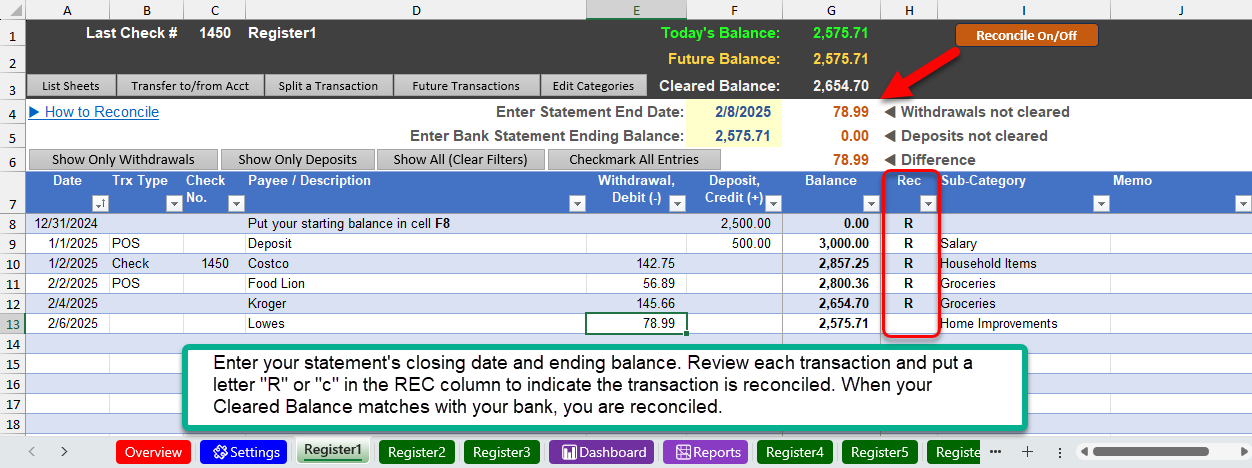
If you need to reconcile your transactions against your monthly bank statement, the Excel Checkbook makes it easy. Click the orange button “Reconcile On/Off” which will display rows that are normally hidden. Enter your bank statement’s info and review each transaction. There are buttons to help you just focus on withdrawals or deposits, and a button that will quickly mark all of your entries as reconciled.
Financial Dashboard
The financial dashboard consolidates all of your bank accounts to a single dashboard. There are filter buttons to easily focus in on a particular year, month, category and/or to focus on a specific bank account. Note: a VBA macro is embedded in the template for this feature. Learn more about macros.
Financial Report/Statement
There’s a printable text-based report available with filter buttons to see expenses and credits by year, month, category and by a specific bank account.
Track Your Progress on Reducing Card Debts
If you have personal loans or credit cards you have stopped using but you’d like to visually track your progress on paying them off, this sheet makes it easy to update your card balances each month in order to visually track your efforts and help to motivate your progress.
Video Demonstrations
- There’s a full walk-through video on how to use the checkbook spreadsheet.
- To see what was newly enhanced as of April 2025, see this separate video that covers new features including split a transaction and enter a transfer between two accounts.
Click the purchase button for immediate download
Use discount code SAVE20 during checkout for 20% percent off! Note: this is not a subscription and the spreadsheet will not expire. Once purchased, you can use it forever! (Previous customers of the 2024 version, please contact me for a special discount code).
Do you also have a small business? You can add the small business edition and use the discount code above for both!
Reviews
 So Grateful
I absolutely love the Excel Checkbook. I used Quickbooks for my home checking for years but it got far too expensive for that. So I searched far and wide for some app that would fit my needs and have a free or reasonable cost. Of course I found nothing suitable. Then I stumbled upon Excel Checkbook Register. I immediately knew it was perfect!
I’ve used Excel for years and knew of its simplicity, and it’s powerful capabilities. The formulas needed for a good home checking system are way above my ability. I’m so thankful this was accessible and for such a reasonable cost. Thanks so very much for making this available to me and people like me. It’s an answer to prayer.
-
Thank you Randi!

 What I've been looking for!
This Excel Checkbook Register – 2025 is perfect for my needs and what I’ve been searching for to keep an electronic register. I am so impressed by the ease of use, the tabs, the clear directions, and all the accounting details I need. I previously used Quicken and generally liked it, but I wanted a stand-alone (offline) checkbook type of register for all my accounting and bank accounts. This is it!!
The best part about all this is Logan’s excellent customer service when I had questions about how some of the functions worked. He has done a great job with his tutorial videos, FAQs and his own personal attention to my questions. What a difference a human makes!! Thank you again for a great product – keep up the good work!
 A Great Checkbook
I have successfully, finally, downloaded the 2025 new version. Any problems I had in downloading were of my own doing! This checkbook has been an answer to my prayers! I have not used it for my personal checkbook; however, and planning to do so this year. The new version is for a very small foundation that doesn’t need all the bells and whistles that every other option I checked has. It is just what I need. Thanks for your kind, patient help!
 Perfect For My Needs (with bonuses!)
I had been looking for a checkbook register on-line with disastrous results.But this new excel sheet checks off all my boxes and more. Can’t wait to get started! I’m so glad the algorithms sent you to me!!
Write a Review
Submit your review | |
Discover more from Excel Checkbook
Subscribe to get the latest posts sent to your email.