A few customers have reported that when they first try to open the Excel Checkbook spreadsheet, they see an error like the one below, which says, “we found a problem with some content in …”. The message offers to recover the workbook. Answer No when prompted.
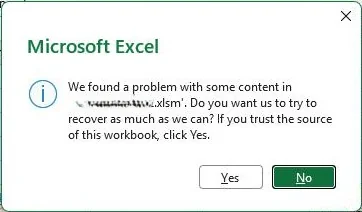
If you answer Yes, the macros in the checkbook are usually erased and thus the buttons and automation features are disabled. The most common cause is that Windows has marked the downloaded spreadsheet template as blocked in file properties. See this article to unblock and/or check that.
Another culprit can be anti-virus software that is especially aggressive against any Excel file with macros. A few users have reported that all is well if they restart (reboot) their computer and re-download the file and try again. You might also need to go to the Trust Center and ensure the folder that has your checkbook spreadsheet is added as a Trusted Location. See the article previously mentioned above for help.
A third reason can be that you have a really old version of Microsoft Office (Excel). For example, Microsoft Office 2010 or 2013 is very old and it will give you errors when attempting to open the checkbook spreadsheet.
Discover more from Excel Checkbook
Subscribe to get the latest posts sent to your email.