I Finally Ditched Quicken After 20 Years (And All I Needed Was a Spreadsheet)
I started using Quicken in the early 1990s. Back then I was running Windows 98 on a beige Dell tower that sounded like a jet engine. Quicken often came bundled with everything in those days. You bought a PC, you got Quicken. It was practically a law of nature.
Over the years I upgraded Windows: XP to Vista (mistake), Vista to 7 (relief), 7 to 10 (fine), and eventually Windows 10 to Windows 11. Quicken came along for part of that ride. I remember upgrading Quicken several times over the years, but I was routinely running a version that was a few years behind, and I was perfectly happy about it.
Here’s the thing. I only ever used Quicken for the basics. Enter transactions. Categorize them. Reconcile against my bank and credit card statements at the end of the month. Run a yearly expense report so I could see exactly how much I spent on takeout and feel bad about myself. That’s it. I never touched the investment tracking. I never really used the budgeting tools. I used to sync it to my bank, which frequently failed! And then my bank wanted extra money for that convenience. Ugh. So I stopped. I always felt uneasy about trusting that whole sync process anyway.
Quicken did the simple things just fine for many years. My old perpetual license cost me maybe $40 and I used it for many years. Dollar-per-year, it was a good deal in software.
But I started to have problems with Quicken. The large data files, extreme sluggishness, the constant nags to upgrade. Then Quicken moved to subscriptions.
Look, I understand why software companies do this. Recurring revenue, ongoing development, server costs, whatever. But when you’re someone like me who uses maybe 15% of the application, paying $50 or more a year feels like renting a mansion to use the bathroom.
I kept putting it off. Every year I told myself, “This is the year I figure out an alternative.” And every year I was nagged by Quicken to upgrade and I grumbled about it. Classic procrastination.
Then one day, I opened Excel and thought, “How hard could it be?”
Turns out, not that hard, especially if you have always loved spreadsheet programs.
Within a day I had built something that handles the basics of what I actually used Quicken for. A formatted table for the check register. A pivot table to summarize expenses by category and month. Data validation with dropdown lists so I could pick categories without typing them every time. A few formulas for running balances.
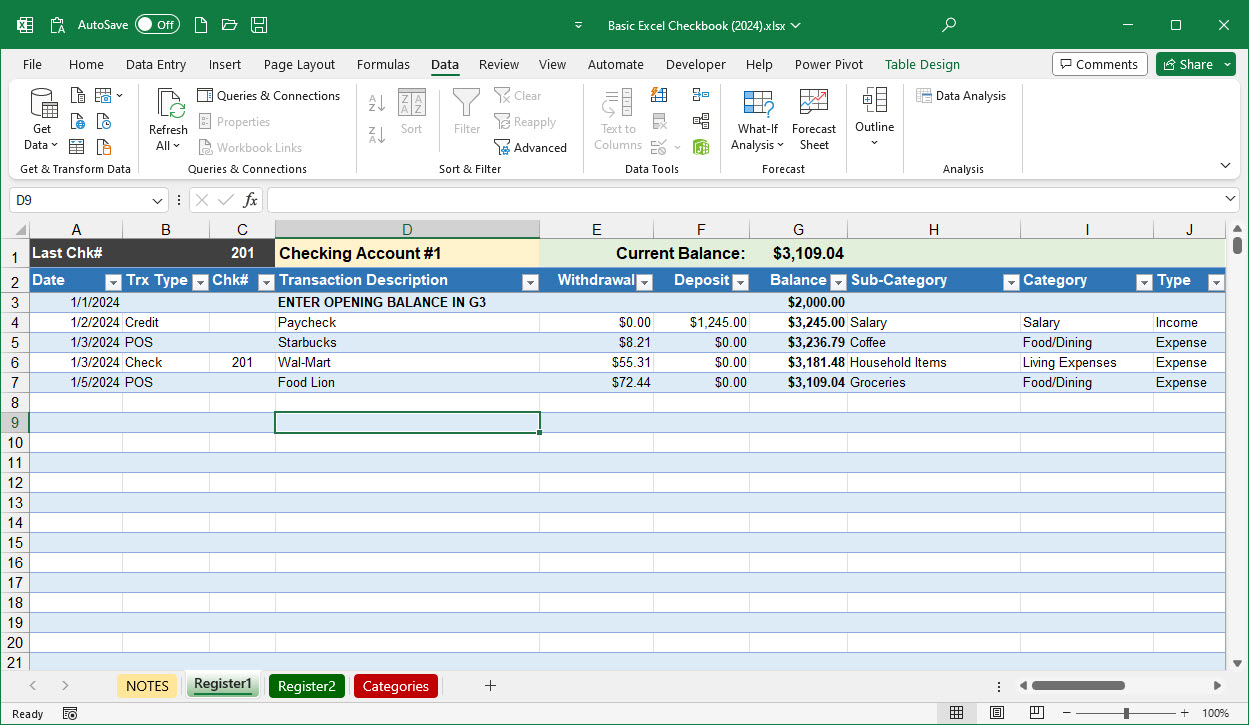
As time went on, I added some slicers so I could filter by date range or account. And next I added a little bit of VBA to automate the stuff that was tedious to do manually.
I sat there looking at it and realized I had just replicated the only parts of Quicken I ever cared about. No subscription. No bloated features I’d never touch. No anxiety about whether the next Windows update would break something. I made a spreadsheet to replace Quicken that I fully own and fully understand.
I shared my checkbook spreadsheet template freely with friends and family. They shared their appreciation and began to suggest enhancements. A few years later I launched this website.
The funny part is that I actually enjoy using it more than Quicken. When it’s a spreadsheet you built yourself, you know exactly where everything is. You want to add a new category? Add it to the list. You want to change how the summary looks? Move some cells around. There’s no hunting through menus or wondering what some checkbox in preferences actually does.
I know a spreadsheet isn’t for everyone. If you use Quicken’s investment tracking, bill pay, bank syncing, or any of the more advanced features, this might not cut it for you. But if you’re like me — someone who just wants a simple check register and an expense report — you might be surprised at how far a well-built spreadsheet can take you. Check out the offerings.
I wasted years paying for a subscription I didn’t need. All it took was one sick day and a little stubbornness.
Discover more from Excel Checkbook
Subscribe to get the latest posts sent to your email.