If you’ve been using Tiller Money to manage your finances, you already know the appeal: your bank transactions automatically flow into a spreadsheet, and you get the flexibility of Google Sheets or Excel to track your budget. But there’s something that nags at you every year—that $79 renewal charge. Year after year, just to keep your financial data flowing. And if you stop paying? The automatic feeds stop, and you’re left with a static spreadsheet that no longer updates. Wondering if there’s an alternative to Tiller? There’s a better way. Replace Tiller with the Excel Checkbook Register (2026 Version). It gives you powerful, full-featured personal finance tracking in Microsoft Excel for a low one-time payment — and it never expires.
The Tiller Subscription Trap: How Much Are You Really Paying?
Tiller Money charges $79 per year for its transaction feed service. That might sound reasonable at first, but the costs add up quickly—especially when you consider what you’re actually getting. Tiller doesn’t provide the spreadsheet itself (that’s Google Sheets or Excel, which you already have). What you’re paying for is the automated bank connection that pulls transactions into your spreadsheet. That’s it. The moment you cancel, the data stops flowing.
| Cost Comparison | Year 1 | Year 3 | Year 5 |
| Tiller Money | $79 | $237 | $395 |
| Excel Checkbook Register | $26.95 | $0 | $0 |
Over three years, Tiller costs you $237. Over five years, that’s $395—all for a service that simply moves data from your bank into a spreadsheet. Meanwhile, the Excel Checkbook Register remains a one-time investment of $26.95. Over five years, you could save over $368 compared to Tiller.
Will Tiller Be Hacked? Are your Bank Login Credentials Truly Safe?
Every day, there’s news about companies getting hacked. Logins and passwords are stolen by the bad guys. I don’t want to take my chances by giving up my bank account login credentials. Do you?
Everything You Need—Nothing You Don’t
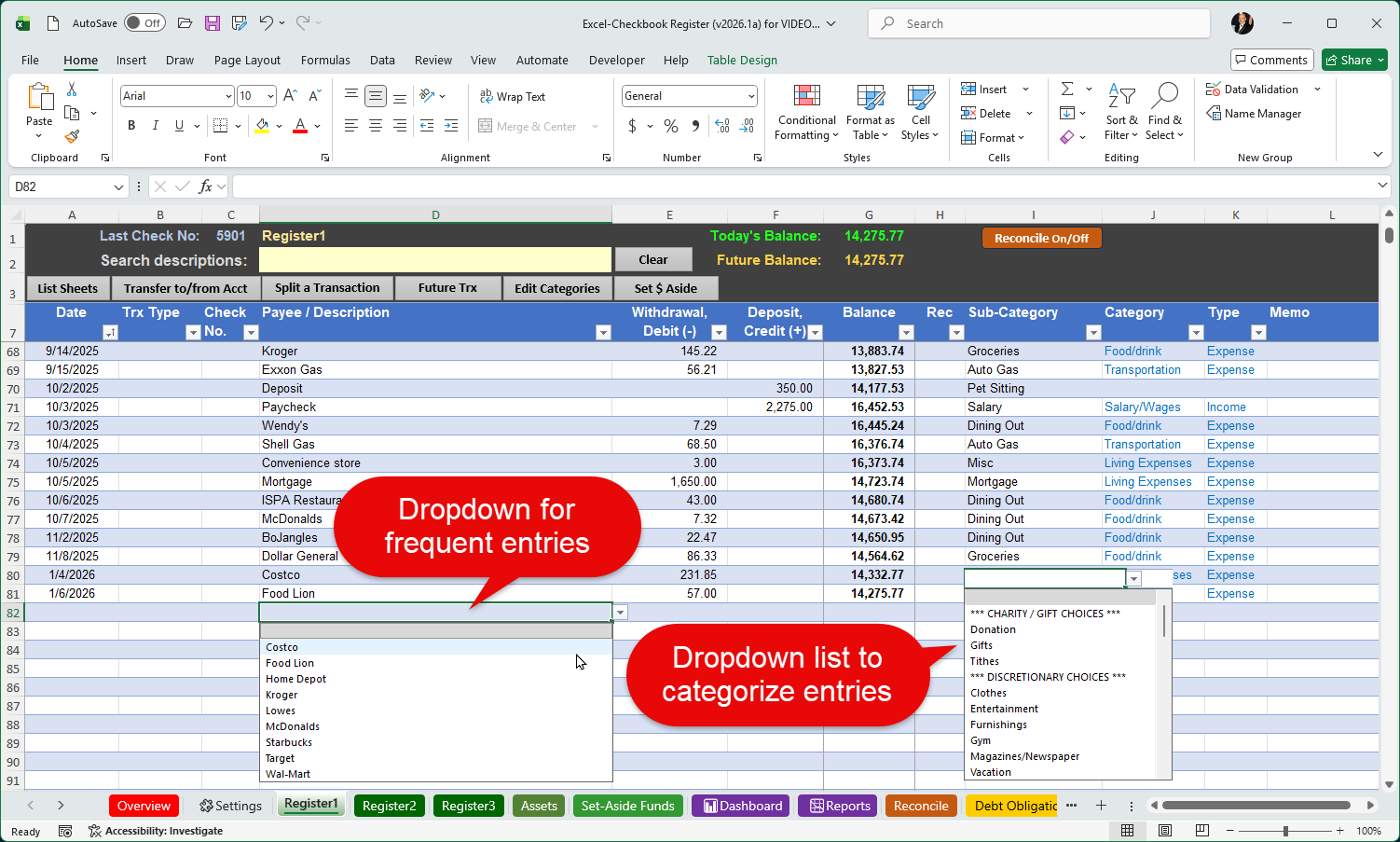
The Excel Checkbook Register isn’t a bare-bones budget sheet. It’s a comprehensive financial management tool built in Microsoft Excel, packed with features designed specifically for personal home finances:
- Manage up to 12 bank accounts (checking, savings, and credit cards) in one workbook
- Categorize every transaction for detailed spending analysis by category and sub-category
- Reconcile your checkbook against bank statements with two different built-in methods
- Post recurring transactions and deposits with a single click using the future transactions feature
- Split transactions across multiple categories for precise expense tracking
- Transfer funds between accounts as a single entry—no double data entry required
- Visual financial dashboard with charts, graphs, and filter buttons for year, month, category, and account
- Printable income and expense reports with convenient filter controls
- Debt obligation tracker with visual graphs showing your payoff progress
- Track assets and net worth with the new Assets feature
- Monitor streaming service subscriptions and their annual costs
- Set aside funds for future expenses using the new envelope-style savings feature
- Search for transactions by description
Five Reasons the Excel Checkbook Register Beats Tiller for Home Finances
1. You Own It—Forever
This is the most important difference. When you purchase the Excel Checkbook Register, it’s yours. No annual renewals. No price increases. No risk of losing functionality if you decide not to re-subscribe. Tiller requires a $79/year subscription to keep bank feeds active—and when you stop paying, the automated connections stop working entirely. The Excel Checkbook Register will work for as long as you have Microsoft Excel.
2. No Dependency on Third-Party Bank Connections
One of the most common frustrations with Tiller is bank connection reliability. Like all services that use aggregators like Plaid and Yodlee to pull your data, Tiller users can run into syncing errors, broken connections, multi-factor authentication failures, and missing transactions. Some banks simply don’t play nicely with these services, and troubleshooting connection issues can be time-consuming. The Excel Checkbook Register takes a different approach entirely: you can import bank transactions from downloaded files (CSV, QFX, OFX), giving you clean, reliable control over what enters your register—without the headaches of unreliable auto-syncing. Many users find that this approach actually gives them a better understanding of their spending, because they’re actively reviewing what comes in.
3. It Works Entirely in Microsoft Excel—No Google Account Required
Tiller was built primarily for Google Sheets, and its best features—including AI-powered transaction categorization—are only available in the Google Sheets environment. If you’re an Excel user, you’re getting a second-class experience with Tiller. Many community templates don’t work properly in Excel, and key functionality may be missing. The Excel Checkbook Register is built from the ground up for Microsoft Excel. Every feature—the dashboard, the reconciliation tools, the debt tracker, the reports—is optimized specifically for Excel. There’s no Google account dependency, no add-on permissions to grant, and no worrying about whether your preferred spreadsheet platform is fully supported.
4. A Complete Financial Tool—Not Just a Data Feed
Here’s something important to understand about Tiller: at its core, it’s a data feed service, not a financial management tool. It pulls your bank transactions into a spreadsheet and provides some starter templates. But the actual budgeting, reporting, debt tracking, and analysis? That’s mostly left up to you to build or find in community-contributed add-ons of varying quality. The Excel Checkbook Register is the opposite: it’s a fully built, ready-to-use financial management system. Out of the box, you get a visual dashboard, income and expense reports, bank statement reconciliation, debt obligation tracking with payoff calculators, recurring transaction posting, transaction splitting, asset tracking, and more. You don’t need to spend hours assembling templates or tweaking formulas—it’s all built in and working from the moment you open the file.
5. Unbeatable Value
At $26.95 (with an additional 20% off using the discount code SAVE20), the Excel Checkbook Register costs about one-third of a single year of Tiller. And unlike Tiller, that’s the only payment you’ll ever make. No annual renewals, no price hikes, no subscription to cancel. For users who are tired of paying year after year for software that depends on external services to function, this is a refreshing return to the way software should work: pay once, use forever.
Who Should Make the Switch?
The Excel Checkbook Register is ideal for anyone who:
- Uses Tiller primarily for home budgeting and expense tracking
- Is tired of paying $79/year for what is essentially a bank data feed into a spreadsheet
- Has experienced frustrating bank connection errors, sync failures, or missing transactions in Tiller
- Prefers Microsoft Excel over Google Sheets and wants a tool that’s fully optimized for it
- Wants a complete, ready-to-use financial management tool—not a collection of templates to assemble
- Values full ownership and control of their financial data in a standard file format on their own computer
- Wants the ability to customize their tracking—because it’s Excel, you can always adapt it to fit your needs
Already comfortable importing transactions from your bank? The Excel Checkbook site includes a full guide on how to import bank transactions, so you can get up and running quickly.
Ready to Stop Renting Your Financial Spreadsheet?
Download the Excel Checkbook Register (2026 Version) for just $26.95. Use discount code SAVE20 at checkout for 20% off! One payment. No subscription. Yours forever.
Discover more from Excel Checkbook
Subscribe to get the latest posts sent to your email.